
Using Wavetables as LFO Curves in Serum 2: Modulation from Sound
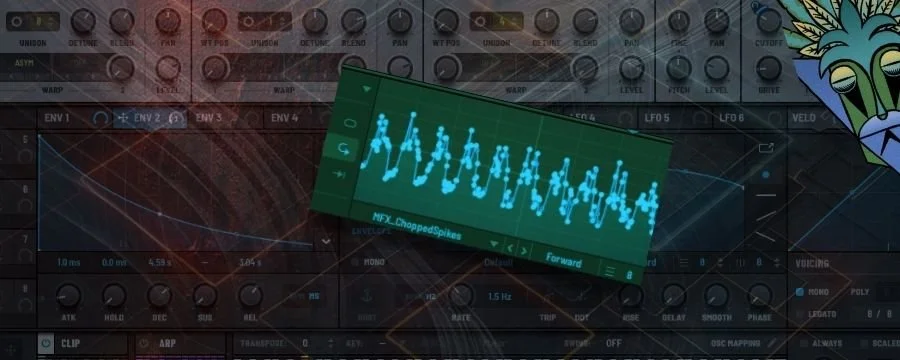
One of the most exciting new features in Serum 2 is the ability to use wavetables as modulation shapes.
Instead of drawing an LFO curve from scratch, you can import any wavetable and turn its shape into a motion path.
That means you’re using sound itself as modulation — a direct link between tone and movement.
For techno producers, it’s a perfect way to inject the same energy and character of your oscillators into your modulation.
Filter sweeps, distortion pulses, and rhythmic FX can now move with the same shape as your sound source — creating cohesion and groove.
“Your sound becomes its own modulator — tone and motion, perfectly synced.”
What It Does
The new “LFO from WT” function in Serum 2 converts the waveform data from a wavetable into an editable modulation curve.
Every frame of the wavetable acts as a modulation step, meaning your LFO now reflects the harmonic and amplitude contours of that wave.

You can:
Generate LFO shapes from any wavetable (built-in or imported).
Smooth, warp, or stretch the curve just like a normal LFO.
Save the resulting modulation shape for reuse across patches.
The result is modulation that carries the same harmonic fingerprint as your sound design.
Why It’s Powerful for Techno

Techno thrives on unity — when modulation, tone, and texture all feel like part of one machine.
Using wavetables as LFOs lets you build connected modulation systems:
A bass filter sweep that follows the same contour as the bass’s waveform.
A distortion pulse shaped by the harmonics of your lead synth.
Pan or delay modulation driven by the wavetable’s internal motion.
This creates motion that feels designed, not random — mechanical, hypnotic, alive.
How to Use Wavetables as LFO Shapes

Open Serum 2 and go to any LFO tab.
Click the Menu icon in the LFO editor.
Choose “Import from Wavetable.”
Select a wavetable (try one of your existing oscillator shapes or any custom file).
Serum converts the wavetable into a modulation curve.
Adjust Smoothing and Grid Snap to refine motion or timing.
Assign the new LFO to any parameter (filter, pan, reverb mix, FX amount, etc.).
Pro Tip: You can layer multiple LFOs derived from different wavetables to make related, multi-tier modulation — for example, one derived from a saw wave for drive, another from a vocal formant table for filter motion.
Creative Ideas
Once you start turning wavetables into LFO shapes, Serum 2 becomes more than a synth — it becomes a motion generator built from its own sound DNA.
Every wavetable carries unique contour data — transients, harmonics, and amplitude shifts — that translate into deeply musical modulation curves.
By using these shapes to drive filters, FX, and dynamics, you create movement that’s sonically tied to the source itself.
Here are a few ways to turn wavetable-based LFOs into expressive, self-referential modulation systems.
Rhythmic Cohesion: Use your main oscillator’s wavetable as the LFO for filter movement — the tone and the motion pulse together.
Spectral Modulation: Import metallic or vocal-like wavetables and use them to animate distortion mix or resonance for hybrid textures.
Granular Vibes: Stretch long wavetable-derived LFOs to very slow rates for drifting, irregular modulation across pads.
Self-Referential FX: Render a loop, import it as a wavetable, and modulate FX with its shape — a feedback loop between sound and modulation.
Wrap-Up
Wavetables as LFO curves blur the line between synthesis and modulation.
You’re no longer just shaping tone — you’re sculpting how your sound moves.
It’s one of Serum 2’s most forward-thinking tools, perfect for producers who want to craft evolving, self-modulating techno sounds without leaving the synth.
“Modulation isn’t random — it’s the echo of your waveform.”






Step into Elysium, the ultimate Serum 2 toolkit for producers exploring the emotional depths of Melodic Techno and Progressive House. Designed to spark instant inspiration and provide endless sonic flexibility, Elysium combines expressive presets, drag‑and‑drop loops, and custom sound‑design tools to elevate your productions.
Crafted by the Mind Flux team, each sound has been meticulously designed to deliver lush atmospheres, punchy low‑end grooves, and euphoric leads — perfect for crafting tracks that flow between deep melodic journeys and peak‑time energy.
Inside, you’ll find ready‑to‑use Serum 2 presets paired with clip banks, MIDI and audio loops, effect chains, and custom wavetables and LFO shapes, giving you everything you need to build tracks fast or dive deep into sound design.